Job Management
When a device stops working, the support team needs more than a ticket number. They need to know who is affected, which device is involved, what has already been tried and what happens next. Disco ICT brings that context together in a job, so technicians can pick up work with confidence and managers can see how the workload is moving.
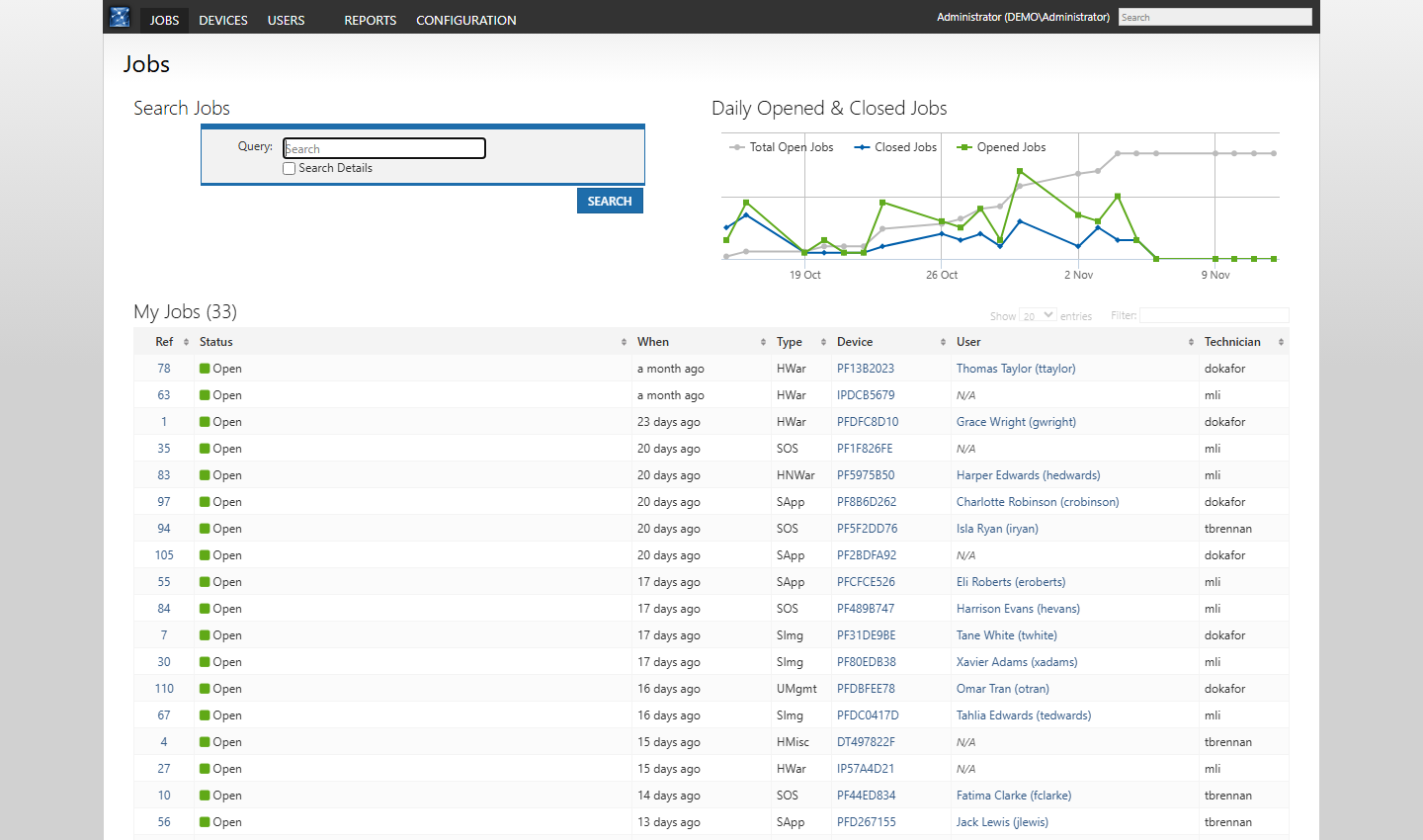
Find the work that needs attention
The Jobs dashboard brings together search, a daily opened and closed jobs chart, My Jobs and Stale Jobs. Lists show the job reference, status, type, device, user and technician, with filters to help narrow the view. A long-running or stale job is easier to spot before it gets lost among the day’s new requests.
Keep the story with the job
Create a job from a device or user record and choose a type, relevant sub-types and whether the device is held. The job links back to the associated records, bringing useful context such as the device model, assignment and warranty or insurance information into view.
Technicians can add comments and attachments as work progresses, record a held device and its location, and indicate when a job is awaiting user action. The resulting history helps the next person understand the problem without starting the conversation again.
Follow through to return
Hardware jobs provide dedicated warranty or repair workflows; non-warranty jobs also bring components, finance, repairs and insurance together. When a device is ready, the team can record that it is ready for return and, once handed back, that it has been returned. Jobs can then be closed when the work is complete.
Depending on your configuration, document templates and provider plugins can support the process too. See the warranty and non-warranty examples for a closer look.